

Comparative tables - AI Notebooks, AI Training, AI Deploy
301 Views
 12.05.2023
  Cloud / AI Deploy
Objective
OVHcloud provides a set of managed tools designed for building your machine learning projects. This guide explains the main differences between our AI tools, commonly called AI Notebooks, AI Training and AI Deploy.
Overview
OVHcloud AI tools work inside our Public Cloud ecosystem. Once logged in to your Public Cloud project, you have access to AI tools including:
- AI Notebooks
- AI Training
- AI Deploy
Each of them is an autonomous tool, billed per minute and with shared elements, such as security tokens, etc.
All AI Tools have access to OVHcloud Object Storage as a central point, allowing you to work with your data securely and easily.
We schematize our AI offers this way:
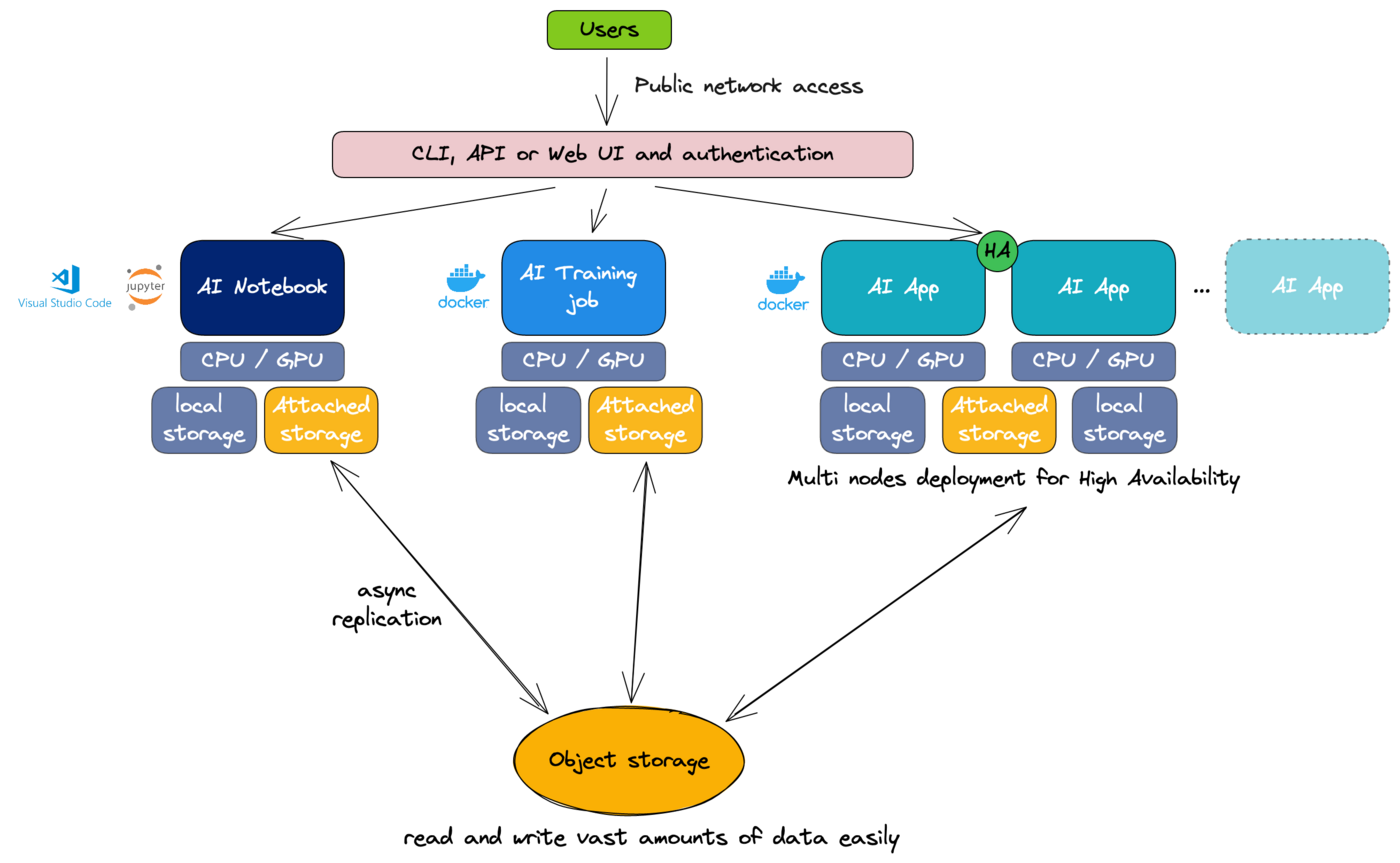
Comparative tables
| Product offers | AI Notebooks | AI Training | AI Deploy |
|---|---|---|---|
| Description | Managed Jupyter or VSCode notebook, linked to compute resources (CPU or GPU) and storage. | Automate your trainings, deploy your own Docker container, linked to compute resources (CPU or GPU), and attached storage. | Deploy with high-availability your own AI application and models via Docker containers or select one from our catalog |
| Billing Resources | per minute | per minute | per minute |
| AI Features | AI Notebooks | AI Training | AI Deploy |
|---|---|---|---|
| Managed Jupyter Notebook with preinstalled libraries | X | ||
| Managed VSCode Notebook with preinstalled libraries | X | ||
| Automate Training phases (timeout, grid computing, ...) | X | ||
| Bring your own Docker image (with notebooks inside, models, etc.) and connect to compute and storage resources | X | X | |
| Deploy your managed applications and models with high-availability | X | ||
| Deploy AI applications from a catalog made with partners | X |
| Management | AI Notebooks | AI Training | AI Deploy |
|---|---|---|---|
| Control panel | X | X | X |
| API | X | X | X |
| CLI | X | X | X |
| Resources | AI Notebooks | AI Training | AI Deploy |
|---|---|---|---|
| CPU resources | X | X | X |
| CPU flavors available | ai1-1-CPU | ai1-1-CPU | ai1-1-CPU |
| GPU resources | X | X | X |
| GPU flavors available | ai1-1-GPU | ai1-1-GPU | ai1-1-GPU |
| RAM Memory | X | X | X |
| Dask computing | X | ||
| Cold-patch resources (adjust GPU/CPU, attached storage) | X | ||
| Local SSD-NVMe storage | X | X | X |
| Local SSD-NVMe storage size | depends on selected flavors | depends on selected flavors | depends on selected flavors |
| Ability to attach a remote storage (Object Storage) | X | X | X |
| Pull Storage Sync (from object storage) | X | X | X |
| Push Storage sync (to object storage) | X | X | |
| Maximum runtime | unlimited | unlimited | unlimited |
| Ability to add a runtime timeout (via CLI) | X |
| Security | AI Notebooks | AI Training | AI Deploy |
|---|---|---|---|
| ACL via Openstack user | X | X | X |
| ACL via tokens | X | X | X |
| Backups and resiliency | |||
| Automatic backup | |||
| Backup when you stop | X | ||
| High availability | X (when replicas > 1) | ||
| Auto scaling | Planned |
| Advanced features and parameters | AI Notebooks | AI Training | AI Deploy |
|---|---|---|---|
| Labels | X | X | X |
| Start / Stop / Resume | X | X | |
| Easily import data from Git/* via UI | X | ||
| Unchanging endpoint URL | X |
Feedback
Please feel free to send us your questions, feedback and suggestions to help our team improve the service on the OVHcloud Discord server
If you need training or technical assistance to implement our solutions, contact your sales representative or click on this link to get a quote and ask our Professional Services experts for a custom analysis of your project.


 AI Tools - Remote SSH Connection
 407
407