

Modifying the vCenter access policy
242 Views
 18.11.2020
  Managed Bare Metal
Objective
To enhance security for your Managed Bare Metal infrastructure, you can restrict and manage the access to vCenter.
This guide explains how to change the access policy for vCenter in the OVHcloud Control Panel.
Requirements
- a Managed Bare Metal infrastructure
- access to the OVHcloud Control Panel
Instructions
In your OVHcloud Control Panel, open the "Bare Metal Cloud" section, then select your service under Managed Bare Metal in the left-hand navigation bar.
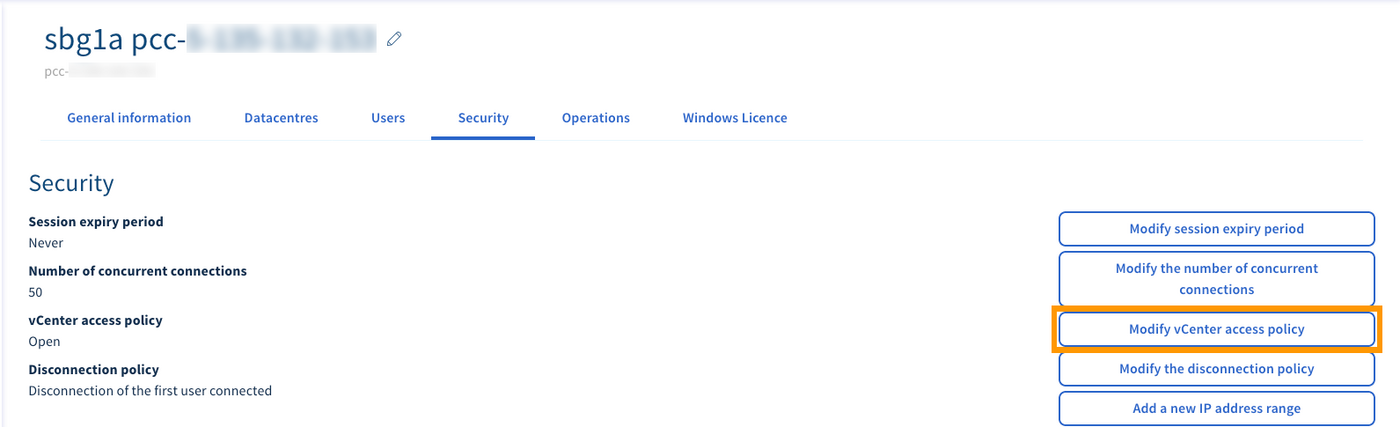
From the main page of the service, switch to the Security tab, then click on Modify vCenter access policy.
In the new Window, choose "Open" or "Restricted" from the drop-down list and click Confirm to apply your selection.
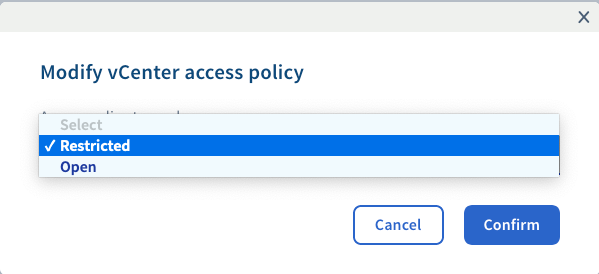
If you have set the access policy to "Restricted", follow up by consulting the guide on Authorising IP addresses for vCenter access.
Go further
Authorising IP addresses for vCenter access
Join our community of users on https://community.ovh.com/en/.


 Setting up a VPN for OVHcloud Zerto DRP
 337
337