

How to delete an OVHcloud DNS zone?
278 Views
 11.03.2026
  Web / DNS Zone
Objective
The DNS (Domain Name System) zone is a domain name’s configuration file. It consists of DNS records that map the domain name to various services and functions.
For more information on DNS zones and servers, see the following guides:
- Everything you need to know about DNS servers
- Everything you need to know about DNS zone
- Everything you need to know about DNS records
For example, you may need to delete a DNS zone for your domain name at OVHcloud in the following cases (non-exhaustive list):
- You are using an active DNS zone for your domain name with a provider other than OVHcloud.
- You no longer use the domain name associated with the DNS zone at OVHcloud.
- You have migrated your services to another provider and you want to cancel your OVHcloud services.
The creation/modification/deletion of a DNS zone in your OVHcloud Control Panel is free of charge.
This guide explains how to delete an OVHcloud DNS zone for your domain name via the OVHcloud Control Panel.
Requirements
- You have a DNS zone in your OVHcloud Control Panel.
- You have sufficient rights on the DNS zone to be deleted. You can find more information in our guide “Managing contacts for your services”.
OVHcloud Control Panel Access
- Direct link: My offers and services
- Navigation path: Click your name in the top right >
My offers and services
Deleting a DNS zone will not delete the domain name associated with it. You will not lose your domain name by deleting a DNS zone associated with it.
Instructions
Before you proceed, check that the DNS zone you want to delete is no longer used by your domain name.
If you delete the active DNS zone for your domain name, your online services (website, email addresses, etc.) will be interrupted.
Perform a WHOIS query to find out whether your domain name’s active DNS zone is the one hosted at OVHcloud.
If the active DNS zone for your domain name is the one at OVHcloud, and you would like to replace it with a DNS zone hosted elsewhere, please read our guide on Modifying the DNS servers for an OVHcloud domain name before deleting any DNS zones.
Click on the tabs below to view each of the 3 steps.
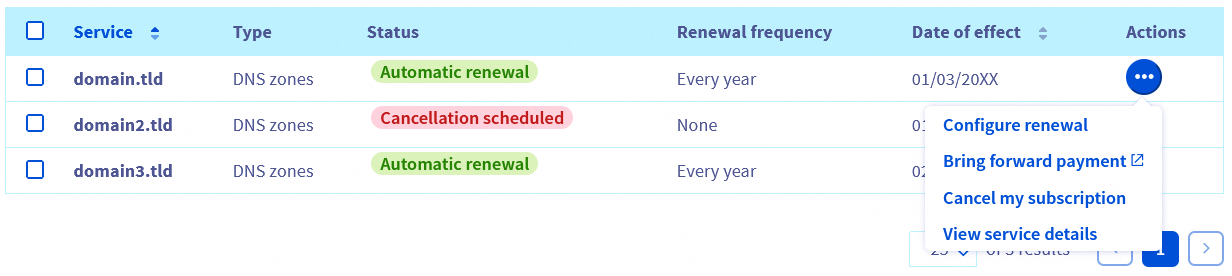
Go to the My offers and services page, then click on the ... button to the right of the DNS zone you want to cancel, then click on Cancel my subscription.
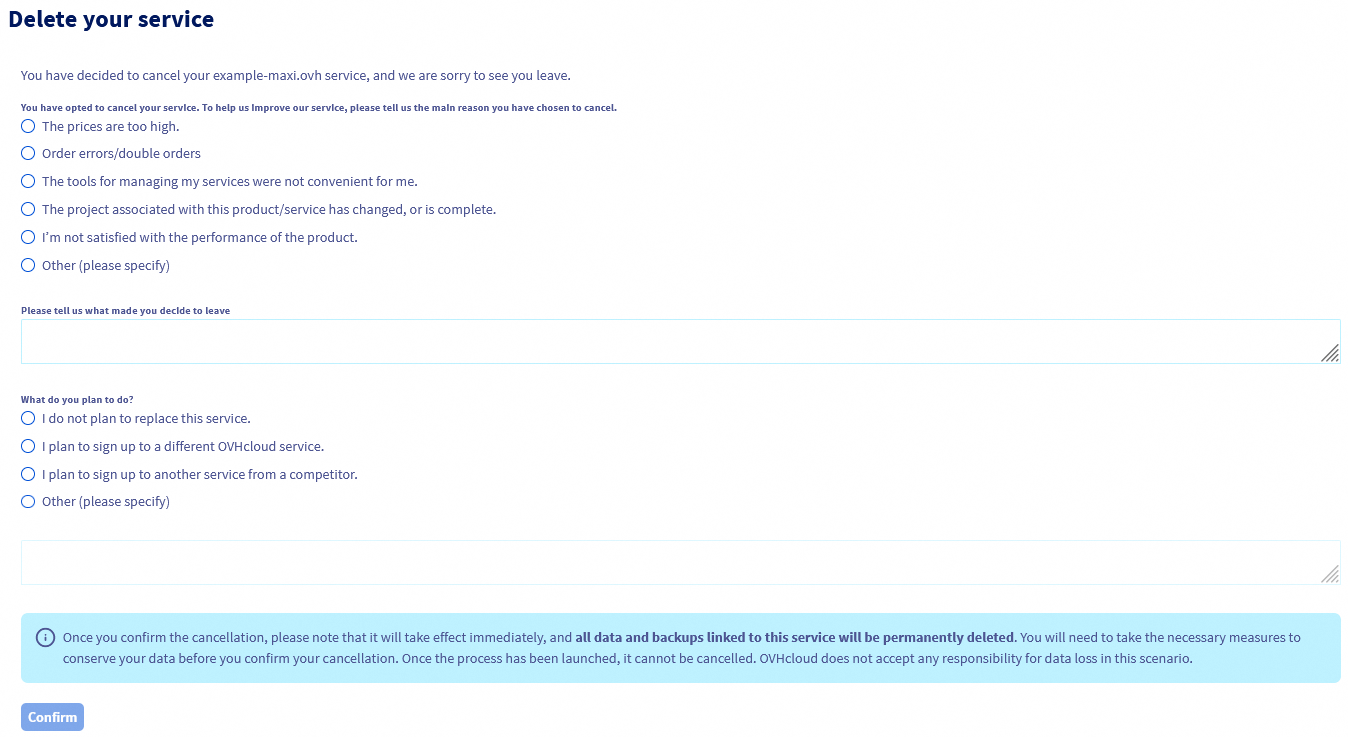
On the new page that appears, specify the reason for your cancellation request and your project, then click on Confirm.
The cancellation of your service will take place on the Date of effect indicated in the "My offers and services" table. If you do not see the "Cancellation scheduled" status appear, refresh the page.
If you want to immediately delete a DNS zone from your OVHcloud Control Panel, complete the 3 steps to request cancellation on the date of effect, then contact OVHcloud support by creating a support ticket from the help center. In the ticket, specify the concerned DNS zone and clearly state your wish to delete it immediately without waiting for the date of effect.
Go further
Managing contacts for your services
Modifying the DNS servers of an OVHcloud domain name
For specialised services (SEO, development, etc.), contact OVHcloud partners.
If you would like assistance using and configuring your OVHcloud solutions, please refer to our support offers.
Join our community of users.


 Editing an OVHcloud DNS zone
 10847
10847