

Configuring Proxy Cache on an OVHcloud Managed Private Registry
99 Views
 25.02.2026
  Cloud / Managed Private Registry
Objective
Harbor provides a proxy cache feature that helps you mirror and cache images from external registries like Docker Hub, Github Container Registry, Quay, JFrog Artifactory Registry, etc. This improves performance and reduces rate limits imposed by external registries.
We strongly recommend using a Docker account (even a free one) to avoid rate limits when pulling images. Without authentication, Docker Hub enforces strict pull limits, which may cause failures when pulling frequently used images.
Requirements
- A running Managed Private Registry.
- Access to the Harbor Web UI (with admin access).
- A Docker Hub account (recommended to prevent rate limits).
Instructions
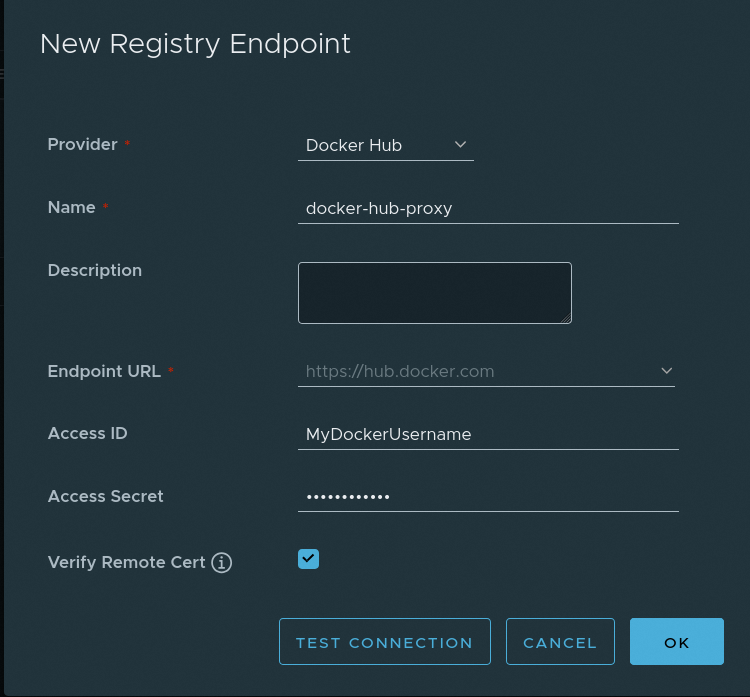
1. Enable proxy cache
- Log in to Harbor Web UI as an Administrator.
- Go to
Administration, thenRegistries. - Click
+ New Endpoint, then selectDocker Hubas the provider. - Fill in the details:
- Registry Type: Docker Hub
- Registry Name: (e.g.,
docker-hub-proxy) - Registry Endpoint:
https://hub.docker.com - Access ID: (your Docker Hub username)
- Access Secret: (your Docker Hub password or personal access token)
- Click
OK.
If you do not provide Docker Hub credentials, your requests may hit rate limits (10 pulls/hour per IPV4 for anonymous users).
2. Create a proxy cache project
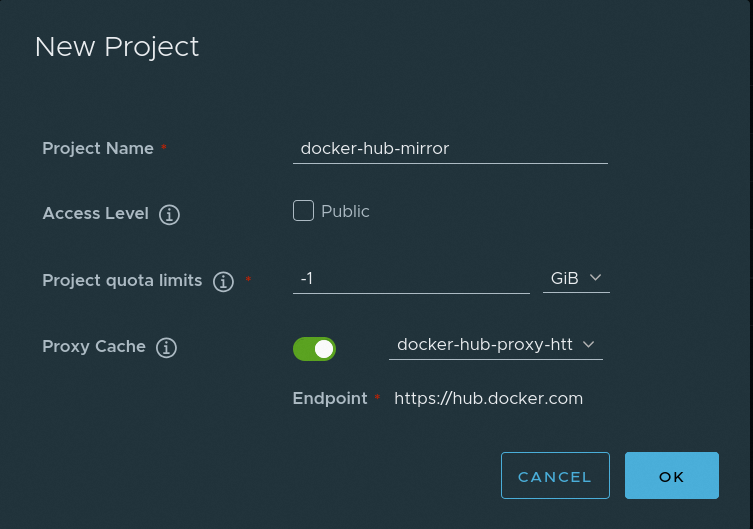
- In the Harbor Web UI, go to
Projects. - Click
+ New Project. - Enter a Project Name (e.g.,
docker-hub-mirror). - Select
Proxy Cache. - Under Upstream Registry, choose the Docker Hub proxy registry created earlier.
- Click
Save.
By default, Harbor creates a 7 day retention policy for each new proxy cache project. See more about Tag Retention Policies.
3. Configure Docker to use Harbor proxy cache
3.1 Log in to the Managed Private Registry
3.2 Pull images via proxy cache
Instead of pulling directly from Docker Hub, use your Private Managed Registry as an intermediary:
Harbor will cache the image locally, so subsequent pulls will be much faster and won’t count against Docker Hub rate limits.
Benefits of using proxy cache
- ✅ Avoid Docker Hub rate limits (with authentication).
- ✅ Faster image pulls for frequently used images.
- ✅ Reduced dependency on external registries.
- ✅ Improved reliability by caching images locally.
Troubleshooting
Getting "Too Many Requests" errors
- Ensure you configured Docker Hub authentication in Harbor.
Conclusion
Using Harbor's proxy cache helps optimize Docker image pulls, avoiding rate limits and improving performance. Be sure to authenticate with Docker Hub in Harbor to prevent rate limit issues.


 Deploying a Helm chart from your private registry in Kubernetes
 529
529