

Installing cert-manager on OVHcloud Managed Kubernetes
313 Views
 06.01.2026
  Cloud / Managed Kubernetes Service
Objective
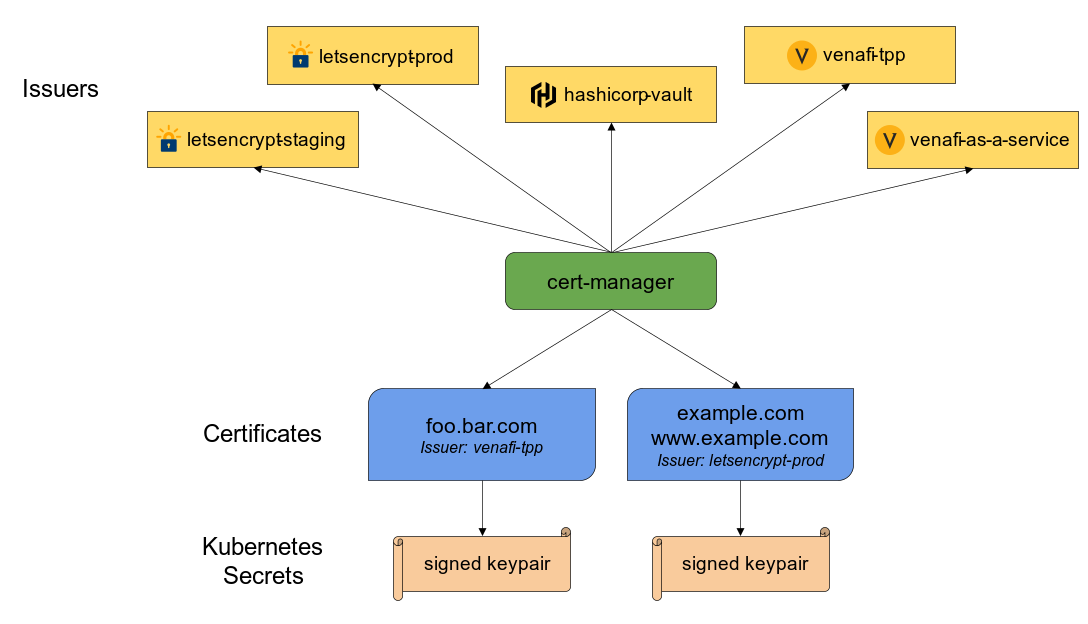
Cert-manager is a Kubernetes add-on to automate the management and issuance of TLS certificates from various issuing sources.
It will ensure certificates are valid and up to date periodically, and attempt to renew certificates at an appropriate time before expiry.
In this tutorial we are going to guide you with the setup of cert-manager on your OVHcloud Managed Kubernetes Service.
Requirements
This tutorial presupposes that you already have a working OVHcloud Managed Kubernetes cluster, and some basic knowledge of how to operate it. If you want to know more on those topics, please look at the OVHcloud Managed Kubernetes Service Quickstart.
You also need to have Helm installer on your workstation and your cluster, please refer to the How to install Helm on OVHcloud Managed Kubernetes Service tutorial.
Installing cert-manager Helm chart
For this tutorial we are using the cert-manager Helm chart found on its own Helm repository.
The chart is fully configurable, but here we are using the default configuration.
Add the cert-manager Helm repository:
These commands will add the Kyverno Helm repository to your local Helm chart repository and update the installed chart repositories:
Create a values.yaml file with the following content:
Install the latest version of cert-manager with helm install command:
values.yaml file is necessary to "fix" blocking ingress-nginx 1.18+ changes.
This command will install the latest version of cert-manager, create a new cert-manager namespace and install the new CRD (CustomResourceDefinitions):
Check cert-manager have been deployed correctly with kubectl get pods --namespace cert-manager command:
Now that the cert-manager is deployed, we need to configure a cluster-issuer to perform Let's Encrypt ACME challenges.
To avoid to be banned by Let's Encrypt robots, for testing purposes, the staging environment should be used before going to prod.
Create an Issuer in a file named issuer.yaml with the following content:
Don't forget to replace [YOUR_EMAIL] by a real value, it will be used for ACME challenges.
Apply the YAML manifest:
Now, any ingress resources will be able to be annotated with:
Please refer to our tutorial on How to secure a Nginx Ingress with cert-manager on OVHcloud Managed Kubernetes for ingresses configuration.
Go further
-
If you need training or technical assistance to implement our solutions, contact your sales representative or click on this link to get a quote and ask our Professional Services experts for assisting you on your specific use case of your project.
-
Join our community of users on https://community.ovh.com/en/.


 Scan for vulnerabilities and misconfigurations of your OVHcloud Managed Kubernetes with Trivy
 397
397