

Access and security settings in Horizon
326 Views
 26.05.2021
  Tutorials
Objective
The OpenStack Horizon interface provides options to configure access to your instances and other services.
For example, you can define security groups to filter incoming and outgoing connections or download an OpenRC file containing the credentials for the OpenStack API.
Requirements
Instructions
Log in to the Horizon interface.
The access and security settings consist of the following sections, accessible via the left-hand menu:
- API Access (under
Project)
The API Access table lists the service endpoints of the OpenStack API.
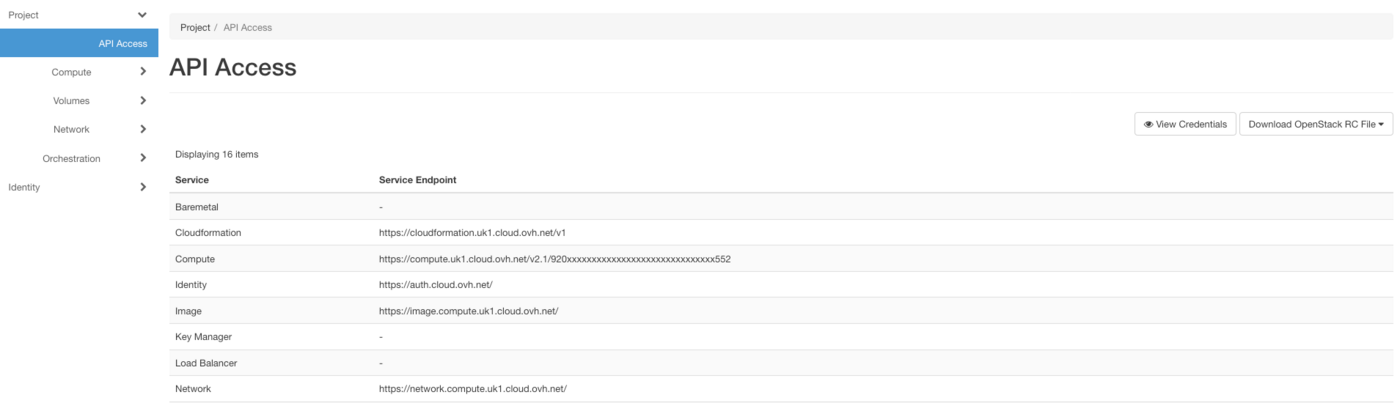
To review the access values to use with the API, click on View Credentials.
Clicking on the button Download OpenStack RC File opens a drop-down menu from which you can choose the appropriate RC file to download.
- Key Pairs (under
Project/Compute)
This section allows you to store and manage SSH key pairs. You can simply create and add a public and a private key by clicking on the button Create Key Pair.

If you have an existing key to add, click on Import Public Key. In the popup window, you can enter a key string or select a key file.
This interface section includes some basic instructions; for more information about SSH keys please refer to this guide.
- Security Groups (under
Project/Network)
Security groups are sets of filter rules that are applied to network interfaces. You can use them to manage access to instances by IP addresses and ports.

Add a security group by clicking on Create Security Group, then apply customised or preset rules to it via the Manage Rules button in the table.
Go further
Join our community of users.


 Introducing Horizon
 311
311