

AI Endpoints - Enable conversational memory in your chatbot using LangChain
75 Views
 19.12.2025
  AI Endpoints
AI Endpoints is covered by the OVHcloud AI Endpoints Conditions and the OVHcloud Public Cloud Special Conditions.
Introduction
Looking to build a chatbot that can hold more natural and coherent conversations with your users?
In this tutorial, we will explore how to implement Conversational Memory using LangChain and the Mistral 7B model thanks to OVHcloud AI Endpoints. This will allow your chatbot to remember previous interactions and use that context to generate more accurate and relevant responses.
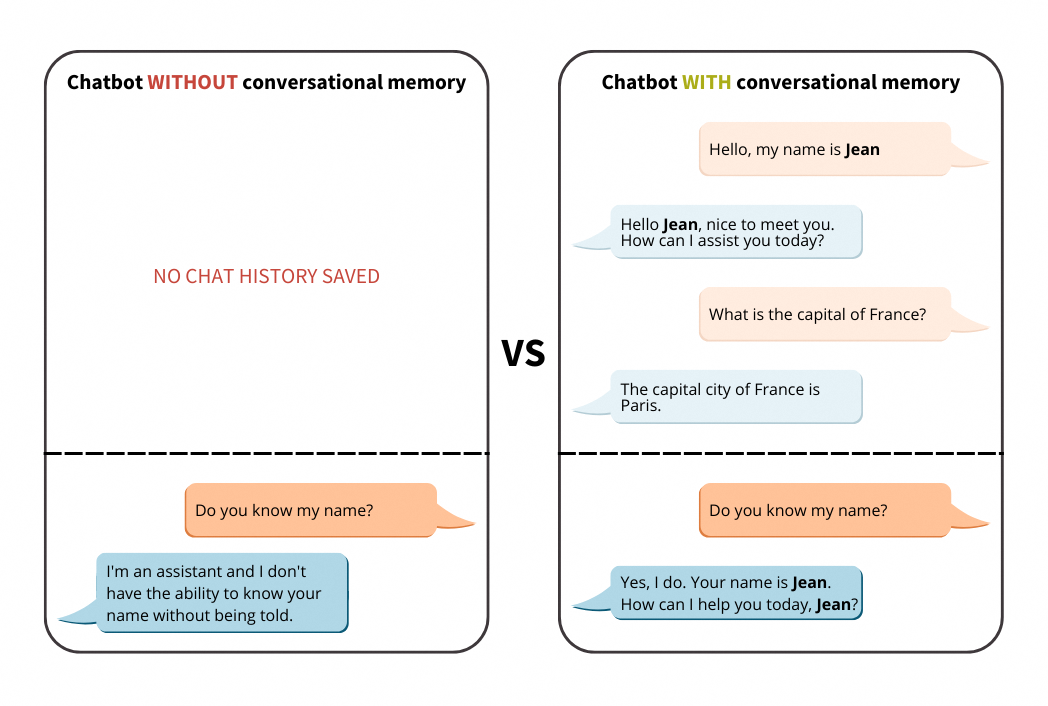
We will introduce the different types of memory in LangChain. Then, we will compare the chatbot behaviour with and without memory.
Definitions
Before getting our hands into the code, let’s contextualize it by understanding the different types of memory available in LangChain:
Conversational memory
Conversational memory for LLMs (Language Learning Models) refers to the ability of these models to remember and use information from previous interactions within the same conversation.
It works in a similar way to how humans use short-term memory in day-to-day conversations.
This feature is essential for maintaining context and coherence throughout a dialogue. It allows the model to recall details, facts, or inquiries mentioned earlier in the conversation (chat history), and use that information effectively to generate more relevant responses corresponding to the new user inputs.
Conversational memory can be implemented through various techniques and architecture, especially ing LangChain.
LangChain memory types
LangChain provides several memory modules that can be used within a ConversationChain. Each has different tradeoffs regarding memory length, token usage, and summary style.
- ConversationBufferMemory: Stores the full list of messages from the conversation. Then, all interactions between the human and the AI are passed to the
historyparameter. - ConversationSummaryMemory: Solves a problem that arises when using ConversationBufferMemory: we quickly consume a large number of tokens, often exceeding the context window limit of even the most advanced LLMs. This second component makes it possible to limit the abusive use of tokens while exploiting memory. It summarizes the conversation history before sending it to the dedicated parameter (
history). - ConversationBufferWindowMemory: It introduces a window into the buffer memory, keeping only the K most recent interactions in memory.
- ConversationSummaryBufferMemory: A mix of ConversationSummaryMemory and ConversationBufferWindowMemory. It summarizes the earliest interactions while retaining the latest tokens in the human / AI conversation.
Requirements
- A Public Cloud project in your OVHcloud account.
- An access token for OVHcloud AI Endpoints. To create an API token, follow the instructions in the AI Endpoints - Getting Started guide.
Instructions
Set up the environment
In order to use AI Endpoints APIs easily, create a .env file to store environment variables:
Make sure to replace the token value (OVH_AI_ENDPOINTS_ACCESS_TOKEN) by yours. If you do not have one yet, follow the instructions in the AI Endpoints - Getting Started guide.
Then, create a requirements.txt file with the required libraries:
Then, launch the installation of these dependencies:
Note that Python 3.11 is used in this tutorial.
Importing necessary libraries and variables
Once this is done, you can create a notebook or a Python file (e.g., chatbot-memory-langchain.ipynb), where you will first import your librairies as follows:
After these lines, load and access the environnement variables of your .env file:
💡 You are now ready to test your LLM without conversational memory!
Test Mistral 7B without conversational memory
Test the model in a basic way and see what happens with the context:
You should obtain the following result:
Note here that the model does not store the conversation in memory, since it no longer remembers the first name sent in the first prompt.
Add memory window to your LLM
In this step, we add a Conversation Window Memory using the following component to fix the memory problem, by using the ConversationBufferWindowMemory from LangChain:
Parameter k defines the number of stored interactions.
Note that if we set k=1, it means that the window will remember the single latest interaction between the human and AI. That is the latest human input and the latest AI response.
Then, we will have to create the conversation chain:
which gives the following code:
By running the previous code, you should obtain this type of output:
As you can see, thanks to the ConversationBufferWindowMemory, your model keeps track of the conversation and retrieves previously exchanged information.
Note: Here, the memory window is k=10, so feel free to customize the k value to suit your needs.
Conclusion
Well done 🎉! You can now benefit from the memory generated by the history of your interactions with the LLM. 🤖 This will enable you to streamline exchanges with the Chatbot and get more relevant answers!
You’ve also seen how easy it is to use AI Endpoints to create innovative turnkey solutions.
➡️ Access the full code here.
Going further
If you would like to find out more, take a look at the following article on memory chatbot with LangChain4j.
If you need training or technical assistance to implement our solutions, contact your sales representative or click on this link to get a quote and ask our Professional Services experts for a custom analysis of your project.
Feedback
Please feel free to send us your questions, feedback, and suggestions regarding AI Endpoints and its features:
- In the #ai-endpoints channel of the OVHcloud Discord server, where you can engage with the community and OVHcloud team members.


 AI Endpoints - Build a Python Chatbot with LangChain
 100
100