

KB0056205
Deleting an email account
300 Views
 19.02.2026
  Email and Collaborative Solutions
Objective
You want to:
- Delete an email account you no longer use.
- Reset an email account to use it with a new email address.
- Reset an email account in order to cancel it.
This guide explains how to delete or reset an email account of your email solution.
Requirements
- A preconfigured OVHcloud email solution MX Plan (available with a web hosting plan)
OVHcloud Control Panel Access
- Direct link: MX Plan
- Navigation path:
Web Cloud>MX Plan> Select your MX Plan service
Instructions
To check if your MX Plan solution is a legacy version, please refer to the table in the “Identifying your MX Plan solution” section of this guide.
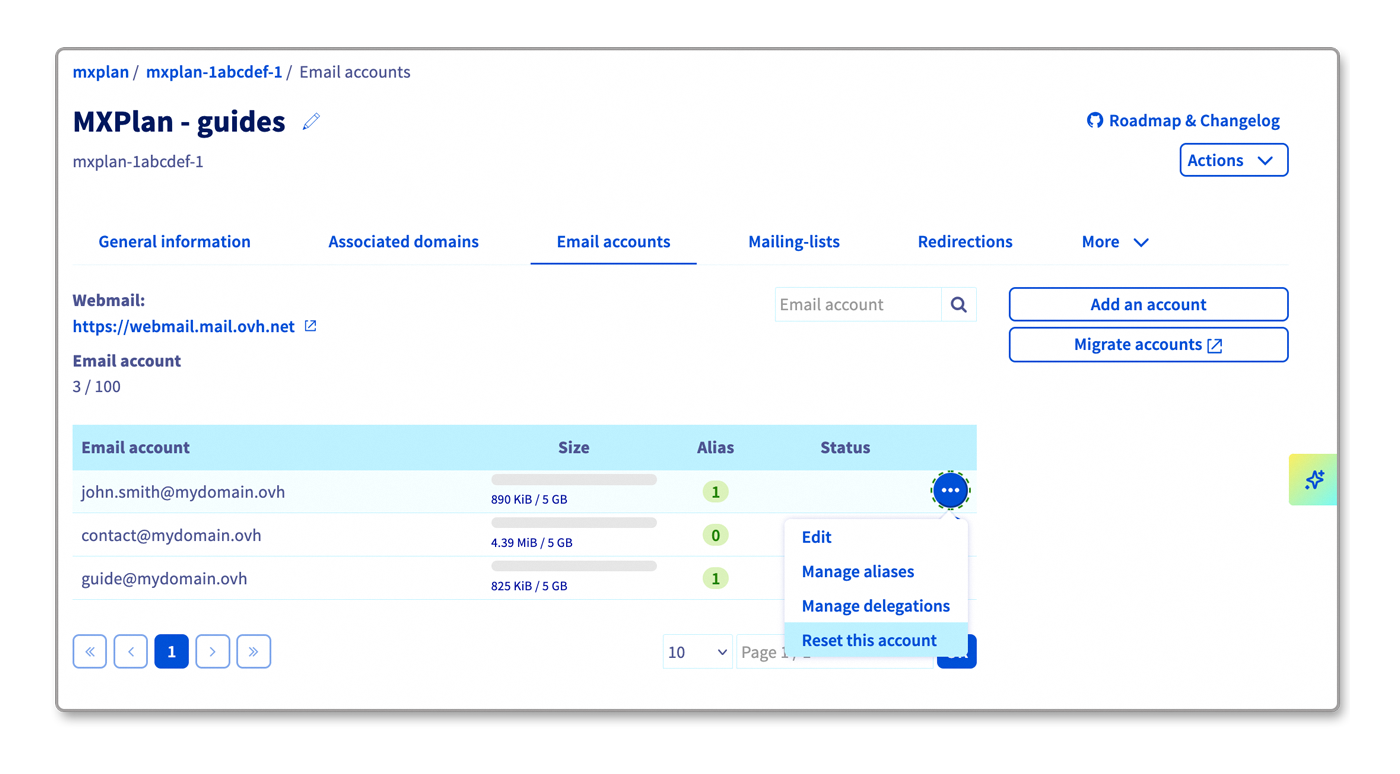
- Go to the
Email accountstab. - The window that appears will display the existing email accounts. Click the
...button to the right of the account you want to modify, then clickReset this account.
Go further
If you would like assistance using and configuring your OVHcloud solutions, please refer to our support offers.
Join our community of users.


 Using email aliases and redirections
 493
493