

Getting started with OVHcloud Shell
42 Ansichten
 21.11.2025
  Public Cloud - Allgemeine Informationen
Objective
This guide explains how to access and use OVHcloud Shell directly from the OVHcloud Manager. It provides an introduction to the environment, its main features, and the essential commands to help you start working efficiently with your OVHcloud resources.
By the end of this guide, you will be able to launch CloudShell, manage your cloud projects from the command-line, and integrate it into your daily workflows.
What is OVHcloud Shell?
OVHcloud Shell is a web-based command-line environment that you can access directly from your OVHcloud Manager. Think of it as a mini computer in your browser, ready to use without any installation.
With OVHcloud Shell, you can:
- Run commands to manage your OVHcloud resources.
- Access your servers, projects, and services securely.
- Automate tasks and scripts without leaving your browser.
It’s designed to make cloud management easier, faster, and accessible even if you’re not a command-line expert. You don’t need to install anything just open Shell and start working.
Benefits of Using OVHcloud Shell
Using OVHcloud Shell directly from the OVHcloud Manager provides key advantages for managing your entire OVHcloud infrastructure, including Public Cloud, Private Cloud, Bare Metal, VPS, storage, networking, containers, and more:
- No Local Setup Required: Start working immediately without installing SDKs, CLI tools, or other dependencies on your computer. Ideal for quick troubleshooting, demos, or temporary access.
- Secure & Managed Environment: Access all your OVHcloud resources safely, with credentials managed automatically by OVHcloud. Provides a controlled and reliable environment for your operations.
- Unified Management: Manage Public Cloud, Bare Metal servers, VPS, storage, networking, containers, and other OVHcloud services from a single, consistent command-line environment. Streamlines operations and ensures consistency across your infrastructure.
- Efficiency and Productivity: Automate routine tasks, run scripts, and perform operations quickly without leaving the browser. Reduces operational complexity and accelerates your workflows.
- Accessible Anywhere: Web-based access lets you log in from any device with an internet connection. Perfect for remote work or managing resources on the go.
In short: OVHcloud Shell centralizes management, boosts productivity, and provides fast, secure, and flexible access to your entire OVHcloud infrastructure, making cloud operations simpler and more efficient.
Requirements
- A Public Cloud project in your OVHcloud account
OVHcloud Control Panel Access
- Direct link: Public Cloud Projects
- Navigation path:
Public Cloud> Select your project
Instructions
How to Access OVHcloud Shell
Click on the OVHcloud Shell button to launch the terminal.
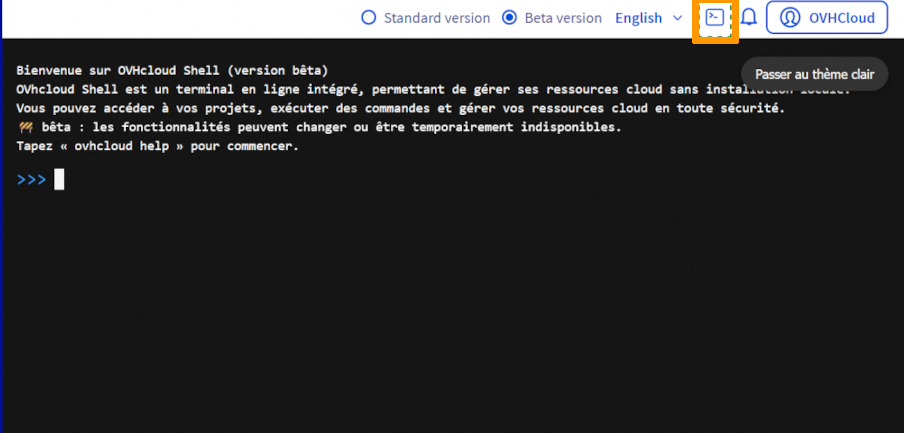
Note: Users are already authenticated with their Customer Panel credentials and get instant access to their resources, no additional login required.
How to Use OVHcloud Shell
Once OVHcloud Shell is open, you can use the help command to view all available commands and options:
The help output lists commands to manage your OVHcloud infrastructure, including Public Cloud, Private Cloud, Bare Metal, VPS, storage, networking, containers, and more.
Example output:
Use ovhcloud [command] --help for detailed guidance on any command.
Key Tip: OVHcloud Shell provides a ready-to-use, secure, and fully authenticated environment for managing all your OVHcloud resources without installing anything locally.
First Commands Examples
To get started, you can list all your Public Cloud projects using:
This command gives you an overview of all your projects and their IDs, helping you identify which resources you can manage immediately.
Example output:
Once you have your Project ID (from ovhcloud cloud project list), you can list all instances in that project:
Replace <cloud-project> with the actual ID of your project.
Example output:
Go further
Join our community of users.


 Die wichtigsten Informationen zum Start mit Public Cloud
 2157
2157