

AI Deploy - Billing and lifecycle
318 Ansichten
 18.03.2026
  AI Deploy
AI Deploy is covered by OVHcloud Public Cloud Special Conditions.
Objective
OVHcloud AI Deploy service provides easiness in AI models and application deployments. You can deploy Docker images to HTTP endpoints, linked to CPU or GPU resources, without the hassle of installing or operating them.
This guide will cover the lifecycle of an AI Deploy app, and associated billing.
Introduction
AI Deploy is linked to a Public Cloud project. The whole project is billed at the end of the month, with pay-as-you-go. This means you will only pay for what you consume, based on the compute resources you use (CPUs and GPUs) and their running time. At this time, we do not support a "pay per call" pricing.
AI Deploy apps lifecycle
OVHcloud AI Deploy allows deployment of Docker images, and each deployment is called an app.
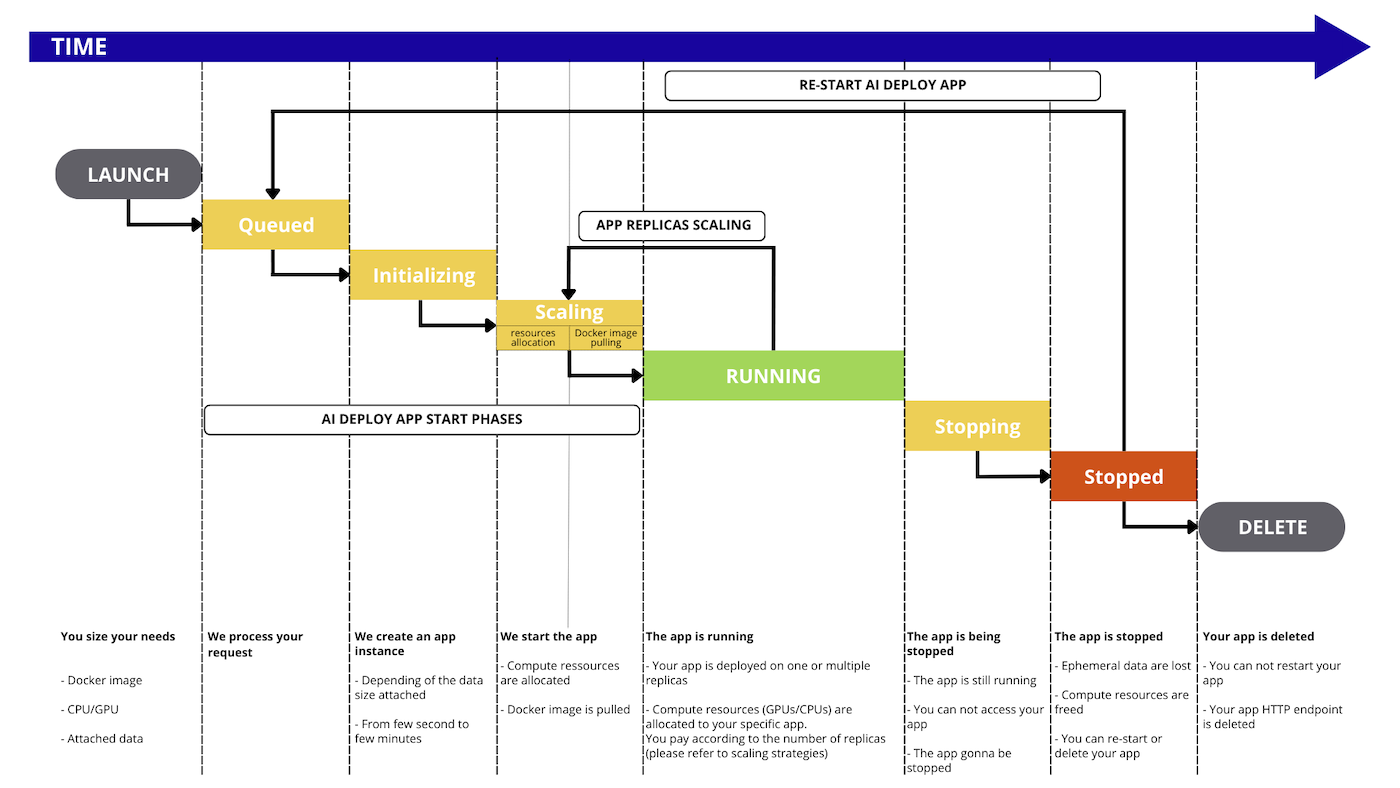
During its lifetime, the app will go through the following status:
QUEUED: The app deployment request is about to be processed.INITIALIZING: The app is being started and, if any, the remote data is synchronized from the Object Storage. To learn more about data synchronization, please check out the Data - Concept and best practices documentation.SCALING: First, the system allocates the necessary compute resources (CPU/GPU) for the app. Then, the specified Docker image is pulled for use in the app. This status is also entered when the number of app replicas is being increased or decreased.RUNNING: At least one replica of the app is available and accessible via its endpoint. As the app scales up to create new replicas, the status transitions back toSCALING. However, there is no interruption in service, and the original replica(s) remain accessible during this time.STANDBY: The app has no running replicas but is ready to scale back up when traffic arrives. This happens after a period with no incoming requests when scaling to 0 is enabled. When traffic arrives, the app transitions fromSTANDBYtoRUNNINGthrough theINITIALIZINGandSCALINGstates.STOPPING: The app is stopping, your compute resources are freed. Ephemeral data is deleted.STOPPED: The app ended normally. You can restart it whenever you want or delete it. It will keep the same endpoint.FAILED: The app ended in error, e.g. the Docker image is invalid (unreachable, built with linux/arm, ...).ERROR: The app ended due to a backend error (issue on OVHcloud side). You may reach our support.DELETING: The app is being removed. When it is deleted, you will no longer see it, it will no longer exist.DELETED: The app is fully deleted.
Billing principles
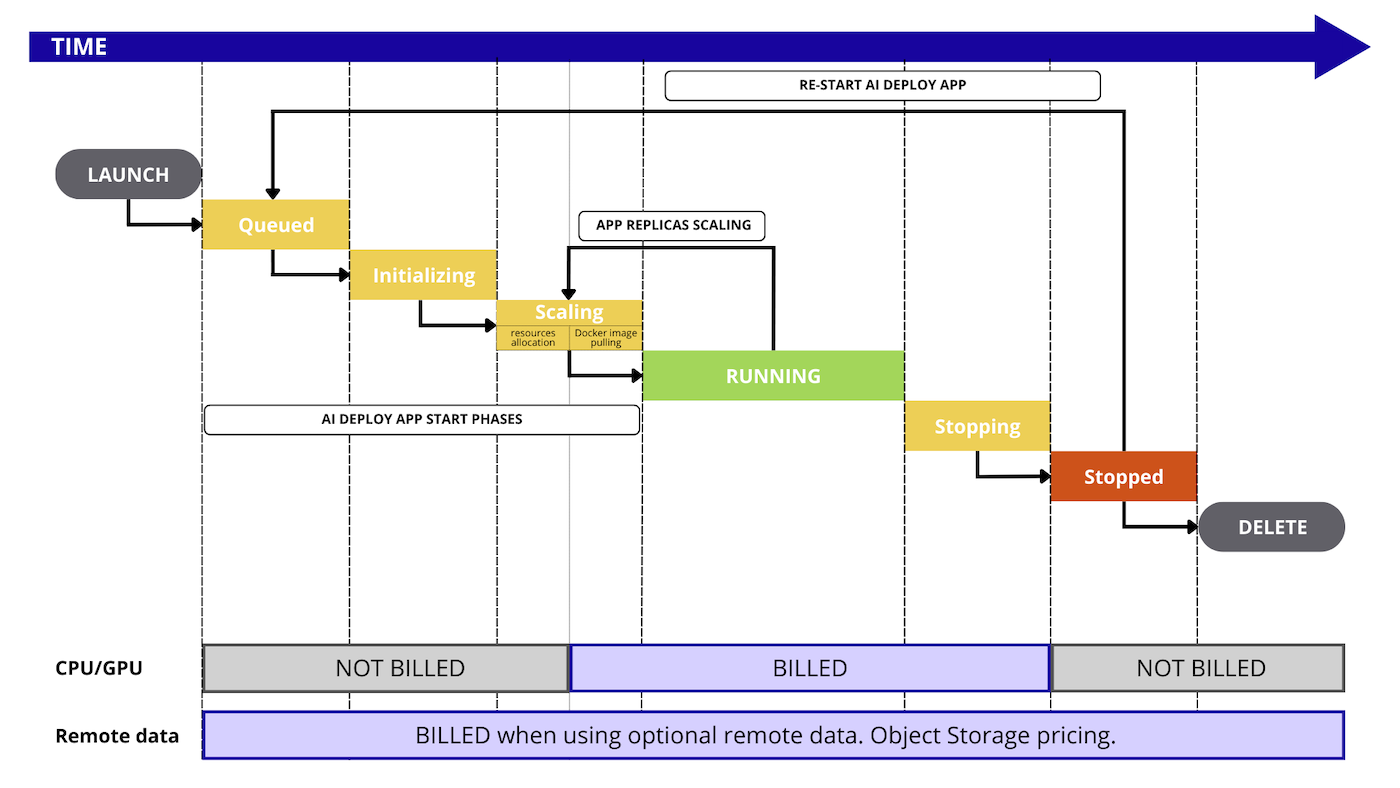
AI Deploy apps are a pay-per-use solution, with billing based on the consumption of compute resources (CPUs or GPUs). You can select the type and amount of resources you would like to work with and will be charged only for the resources consumed during the SCALING and RUNNING phases of your app replicas.
We do not provide a pay-per-call pricing so far.
Included resources in AI Deploy are:
- AI Deploy managed service (zero infrastructure to manage).
- Dedicated CPU/GPU compute resources (based on the selected amount).
- Ephemeral storage when the app is running (storage space related to compute resources sizing).
- Ingress/Egress network traffic.
- Monitoring tool and live metrics (Grafana).
Optional resources, not included with AI Deploy, are:
- Remote storage space, based on OVHcloud Object Storage pricing.
- For this optional Object Storage, Egress traffic when communicated outside OVHcloud
- Private Docker registry if any.
Here is a detailed graph that illustrates every step that is billed or not during the AI Deploy workflow:
Compute resources details
During the app creation, you can select compute resources, known as CPUs or GPUs. Their official pricing is available in the OVHcloud Control Panel or on the OVHcloud Public Cloud website.
Rates for compute are mentioned per hour to facilitate reading of the prices, but the billing granularity remains per minute.
Once you select the compute resources, you can specify the scaling strategy:
- Fixed scaling: you can specify a fixed amount of replicas, starting at one. Please note that with one replica, you will not benefit from high-availability.
- Auto-scaling: you can specify a minimum and maximum amount of replicas, and a metric that will act as a trigger for scaling up or down (CPU, RAM usage or a custom metric). Each replica will benefit from the compute resource selected before.
Storage details
Ephemeral local storage
Each compute resource (CPU or GPU) comes with local storage, that we can consider ephemeral since this storage space is not saved when you stop or delete an AI Deploy app.
The sizing depends on the selected amount of compute resources, check the details on the OVHcloud Public Cloud website.
This storage space can be used by your Docker image, for local operations.
Remote Object Storage
When working with remote data, you pay separately for the storage of this data. The pricing of Object Storage is separate from the app pricing.
Pricing examples
For these examples, we will take a pricing of 1,95€ / hour per GPU NVIDIA V100s and 0,03€ / hour per CPU. Pricing may vary, please refer to the official pricing page.
Example 1: a GPU app for 10 hours then deleted
We deploy one AI Deploy app, with 2 x GPUs and we keep it running for 10 hours then we delete it.
We receive thousands of calls: it's included (no pay per call provided, you pay running compute).
- compute resources per replica: 2 x GPU NVIDIA V100s (1,95€ / hour)
- scaling: fixed
- replicas: 1 only
- amount of calls: unlimited
- duration: 10 hours then deleted
Price calculation for compute: 10 (hours) x 2 (GPU) x 1 (replica) x 1,93€ (price / GPU) = 39 euros, billed at the end of the month.
Example 2: multiple AI Deploy apps for 5 hours then deleted
We start 15 x AI Deploy apps in parallel, each of them with one vCPU.
We receive thousands of calls: it's included (no pay per call provided, you pay running compute).
- compute resources per app with fixed scaling: 1 x vCPU (0,03€ /hour /cpu)
- scaling: fixed
- replica: 1 only
- amount of calls: unlimited
- duration: 5 hours then deleted
Price calculation for compute: 15 (app) x 5 (hours) x 1 (CPU) x 0,03€ (price / CPU) = 2,25 euros, billed at the end of the month.
Example 3: GPUs and autoscaling
We start 1 x AI Deploy app with autoscaling configured to 1 replica minimum, and 3 replicas maximum.
We receive thousands of calls: it's included (no pay per call provided, you pay running compute).
- compute resources per replica: 1 x GPU (1,93€ /hour /gpu)
- scaling: auto-scaling, from 1 to 3 replicas
- amount of calls: unlimited
- duration: 5 hours with 1 replica running, then a peak with 1 hour at 3 replicas, then stopped and deleted.
Price calculation for compute will vary over time due to auto-scaling: 1 (app) x 5 (hours) x 1 (replica) x 1 (GPU) x 1,93€ (price / GPU) = 9,65 euros + 1 (app) x 1 (hour) x 3 (replicas) x 1 (GPU) x 1,93€ (price / GPU) = 5,79 euros Total is 15,44 euros, billed at the end of the month.
Feedback
Please send us your questions, feedback and suggestions to improve the service:
- On the OVHcloud Discord server
If you need training or technical assistance to implement our solutions, contact your sales representative or click on this link to get a quote and ask our Professional Services experts for a custom analysis of your project.

