

OVHcloud VPS FAQ
1459 Views
 24.03.2026
  Cloud / Virtual private servers
General questions about VPS offers
What is a VPS, and what is it used for?
A virtual private server (VPS) is used for hosting websites (e-commerce, content, visual media) and software applications (portals, extranets, collaborative solutions, wikis, CRM). Unlike shared hosting, a VPS offers an isolated environment, dedicated to the customer. Our VPS solutions bridge the gap between shared web hosting and dedicated servers, combining performance and reliability without the burden of hardware management. You can also easily upgrade your configuration without changing servers.
What are the advantages of an OVHcloud VPS?
OVHcloud VPS offers provide excellent value for performance, with unlimited traffic and several global locations for low latency and improved accessibility, depending on your needs.
Is a VPS solution the right choice for me?
Using a VPS requires basic knowledge of server administration. To bear this in mind is crucial for effectively managing your OS (Linux or Windows), and setting up your applications, like PrestaShop or WordPress, for example.
If you need a VPS but lack the technical expertise to manage it, consider reaching out to one of our partners for assistance.
If you require provisioned resources but prefer not to deal with server administration, we recommend opting for our Performance web hosting plans.
Can I easily upgrade my VPS to a higher range or downgrade to a lower configuration?
Yes, you can upgrade your configuration from the OVHcloud Control Panel, without manually migrating your data. The upgrade options available depend on the range and model of the VPS.
However, to downgrade your configuration, you will need to subscribe to a new plan, transfer your data, then cancel your old service. Our support team is available to assist you if necessary.
What region or country should I choose for my VPS?
The closer your data centre is to your audience, the lower the latency will be, leading to a better user experience and increased trust in your services.
What is the advantage of a VPS located in Europe?
Hosting your VPS with OVHcloud in France or generally within the EU offers advantages such as competitive pricing and reinforced data protection. Your service is not subject to the US CLOUD Act, shielding it from non-European interference.
Are backups included with my VPS?
Yes, when you order a VPS, a daily backup option is included free of charge.
For even better protection, you can also opt for our Premium backup option. It offers:
- The option to revert to a backup that is up to a week old.
- The option to schedule backups, optimizing data management and minimizing impact on business operations.
In addition, we offer:
- Snapshots: You can create manual, instant snapshots that capture the exact state of your VPS just before an update or critical change.
- An external backup: Store your data on a separate, secure disk, allowing for easy recovery if a major incident occurs.
By using these solutions, you can customize your backup management to fit your security and business continuity needs.
Visit our VPS web page to learn more about the available options.
Can I host several websites on a VPS?
Yes, a VPS can be configured to host multiple websites or projects. You can partition your storage space to suit your needs, and use specialized interfaces such as Plesk or cPanel to simplify your website management.
Will I get a domain name and email service included with my VPS?
No, our VPS solutions do not include a domain name or email service. These services can be ordered separately in the OVHcloud Control Panel.
How do I choose between a VPS and a web hosting plan?
Web hosting plan
- Ideal for basic hosting needs with a pre-configured setup.
VPS
- More flexibility and control, perfect for scaling projects with complex configuration needs.
If you host web services on a VPS, you can install your preferred software, customize server settings, and host multiple websites with dedicated resources. Please note that a VPS needs to be configured in a way that suits your application requirements and is adapted to your business growth.
What is the difference between a VPS and Public Cloud solutions?
VPS
- An optimized and dedicated virtual machine suitable for both pre-production and production, designed to host several web projects.
OVHcloud Public Cloud
- Offers a multi-server infrastructure with high availability and a private network (vRack), and is designed for complex, scalable architectures.
What are the advantages of a VPS, compared to a dedicated server?
VPS
- Offers simplified management without hardware maintenance, ideal for projects needing tight control.
Dedicated server
- Recommended for complex infrastructure that requires full hardware control and guaranteed performance.
A VPS eliminates the need to manage physical hardware such as storage, RAM, and CPU, making it well-suited for most web applications. As your business grows, you can upgrade your VPS, or migrate to a dedicated server or a Public Cloud solution for a more flexible and powerful infrastructure.
What bandwidth is allocated to my VPS? Is it guaranteed?
The bandwidth listed on our VPS web page is guaranteed. It is the minimum amount allocated to your service.
Which SLA is applied to my VPS?
An OVHcloud VPS includes a 99.9% SLA.
What are the unique features of a Local Zone VPS?
With a Local Zone VPS, you can significantly reduce access times to your sites and applications, because your data is hosted closer to your users. This creates a better user experience by reducing latency whenever applications require a minimized response time. Simply select one of our worldwide locations when placing an order.
Keep in mind that a Local Zone VPS, unlike a regular VPS, does not include security features like Anti-DDoS, or advanced options such as Additional IP and Load Balancer.
A Local Zone VPS also meets the needs of projects with data residency and sovereignty requirements. By hosting your services in a specific region, you can easily meet local regulations relating to data processing and storage, such as the European GDPR.
Can I migrate my VPS from a Local Zone to a data centre, and vice versa?
No, you cannot migrate services directly. You will need to order a new VPS, transfer your data, then cancel your old service. Our support team can guide you through these steps if needed.
What are the risks of using a VPS without DDoS protection?
Virtual private servers without anti-DDoS protection are automatically exposed to distributed denial-of-service (DDoS) attacks, potentially resulting in service outages and serious security breaches.
- Direct exposure: If your server is targeted by a DDoS attack, the influx of malicious requests may overwhelm it, causing your sites and applications to become inaccessible.
- No automatic mitigation: To protect your server, you will need to fend off attacks using third-party security software or specific configurations.
- Additional management burden: The lack of robust, built-in security presents a major risk, highlighting the need for vigilant monitoring and proactive strategies, particularly for high-traffic projects.
If resilience against DDoS attacks is a critical factor for your project, we recommend opting for an OVHcloud VPS hosted in one of our data centres, which comes with built-in protection.
Questions related to VPS administration
How do I connect to my VPS?
You can log in to your VPS remotely, using the credentials provided by email after service delivery.
The connection method depends on which operating systems are in use.
All the details are set out in our guide on how to get started with a VPS.
Does OVHcloud provide software configuration assistance for my VPS?
While we cannot offer software configuration or administration assistance, we do provide some tools and resources to help you get started.
For example, we offer a range of pre-configured templates and images for popular operating systems and applications to help to quickly deploy your VPS. We also provide the OVHcloud Control Panel, where you can manage your VPS, including tasks such as restarting, reinstalling, and monitoring resources.
Additionally, our documentation and knowledge base contain a wealth of information on configuring and managing your VPS.
However, for specific software configuration assistance, we recommend reaching out to our community or seeking the help of a qualified system administrator or developer via our partner portal.
What are the best practices for sending emails from a VPS?
To prevent your emails from being marked as spam, you need to configure your server correctly.
This includes:
- email authentication (SPF, DKIM, DMARC),
- reverse DNS (PTR) configuration,
- following email providers’ best practices.
For more details, see our dedicated guide: How to prevent your emails from being marked as spam.
Can I install more than one operating system on my VPS?
OVHcloud installation templates only allow for one operating system.
Custom configurations can be applied from the customer's side and are the responsibility of the server's administrator. OVHcloud services do not include administration tasks, such as software configuration or external tools.
If you encounter configuration and administration issues, we recommend reaching out to our community or seeking the help of a qualified system administrator or developer via our partner portal.
Can I install virtual machines on a VPS by using virtualization software (such as Proxmox)?
OVHcloud installation templates for VPS do not include the Proxmox Operating System or a similar OS for virtualization.
Custom configurations can be applied from the customer's side and are the responsibility of the server's administrator. OVHcloud services do not include administration tasks, such as software configuration or using external tools.
If you encounter configuration and administration issues, we recommend reaching out to our community or seeking the help of a qualified system administrator or developer via our partner portal.
Is it possible to choose the hardware for my VPS (GPU, CPU, etc.) or upgrade it?
A VPS cannot be customized or modified at the hardware level.
Select a VPS model in the order process that meets your minimum requirements, then you can upgrade it as required.
My VPS is too slow, can I move my VPS to another host?
To resolve performance issues on your VPS, you will need to provide specific test results to our support team.
Note that your VPS must be booted into rescue mode to rule out any possible software issues.
Contact our support team by creating a request in the OVHcloud Help Centre so we can provide you with the complete list of tests required for a proper assessment.
I ordered a new VPS, can I move the remaining subscription time from my old VPS or have it refunded?
This is generally possible but the process requires a request to our support team via the OVHcloud Help Centre.
Before you proceed, ensure that you have migrated any data still needed to your new service or create backups of your data.
Can I move my VPS to a different OVHcloud data centre in a different country?
It is not possible to migrate a VPS to another data centre. To achieve this, you can perform a manual migration:
- Download your data from the current VPS.
- Order a new VPS.
- Upload your data to the new VPS.
- Cancel the old VPS.
How many Additional IPs can I configure on a VPS?
A VPS is limited to 16 Additional IP addresses.
Please refer to our guide on how to configure IP aliasing for IP address configuration examples.
Can I add IP blocks to my VPS?
It is not possible to add IP blocks to a VPS.
You can configure up to 16 Additional IP addresses on a VPS.
Can I change the VPS associated with my license (Plesk, cPanel)?
Licenses can be moved between servers but there are limitations.
The best option is to log in to our API console with your customer account credentials and check if your license can be moved to a different VPS. Find the basics in our guide on how to get started with the OVHcloud API.
Once connected, use the following calls depending on the software in use:
Plesk
cPanel
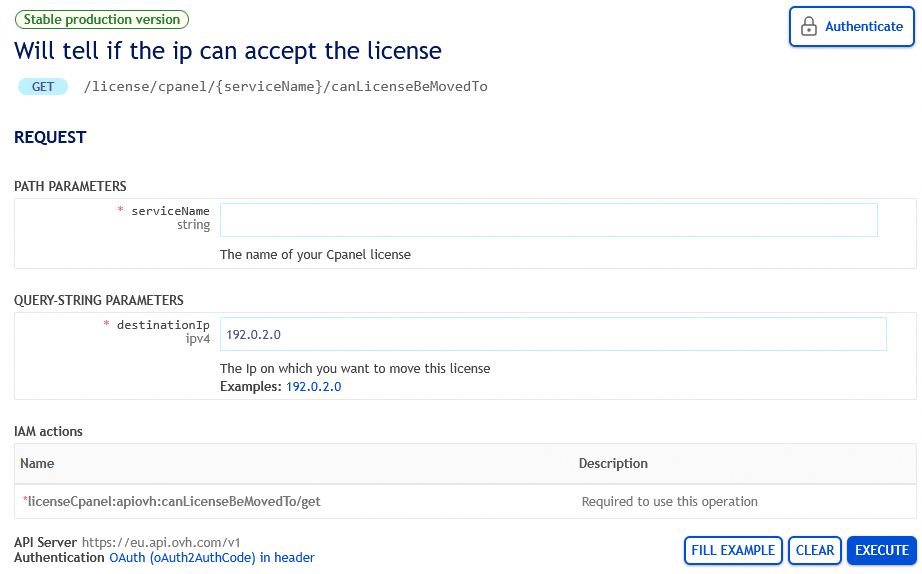
Enter the parameters as follows:
serviceName: Enter the internal name of your license (see the sectionLicencesin your OVHcloud Control Panel).destinationIp: Enter the IPv4 address of the destination service.
Click the button EXECUTE.
If the result is negative (false), the reason will be included in the RESPONSE field.

If the destination IP is compatible with your license (true), you can use the corresponding call to move it:
Plesk
cPanel
Questions regarding security and backup
How do I secure my VPS?
By default, the VPS is provided with only the selected operating system installed. The VPS administrator is responsible for applying an appropriate security configuration once the VPS is delivered.
To do this, please refer to our guide on how to secure a VPS.
How can I download my files or a backup of the VPS?
There are several options available, for example:
- Download via SFTP: Connect to your VPS with a software client capable of SFTP (for example FileZilla), then transfer all files in the system's root directory.
- Download via
rsync(command line tool): Use the commandrsync -avz -e ssh username@vps_ip_address:/ /local_directory/to download all files and folders from your VPS. - Download via the option Automated Backup: Follow our guide on how to use automated backups on a VPS to download files from a backup.
- Download via the option Snapshot: Follow our guide on how to use snapshots on a VPS to download a VPS snapshot.
How can I download my VPS as a VM file?
It is not possible to download a VM file of an OVHcloud VPS. However, you can utilize the VPS option Snapshot in your OVHcloud Control Panel to retrieve an image file.
Follow our guide on how to use snapshots on a VPS to create and download a VPS snapshot.
You can then locally convert the downloaded snapshot file into a format corresponding to your needs.
Consider reaching out to one of our partners for further assistance.
How can I access my backup storage from an IP address outside my service?
Access to the backup storage of your VPS (FTP storage) might be restricted to IP addresses linked to a service within your OVHcloud customer account.
In order to add other IP addresses from which to access, you can use the OVHcloud API.
This will allow you to retrieve your backup data from a different service through various protocols (FTP, NFS, CIFS).
Only OVHcloud IP addresses can be authorized.
Log in to the OVHcloud API console with your customer account credentials and use the following call:
Edit the parameters as follows:
serviceName: Enter the internal name of your VPS (vps-x11x11xyy.vps.ovh.net).cifs: Set totrueif applicable.ftp: Set totrueif applicable.ipBlock: Enter the IP address that will have access, in the form203.0.113.100/32.nfs: Set totrueif applicable.
Click the button EXECUTE.
To verify that your IP address is authorized, use the following call:
Is my VPS protected from external attacks?
Although OVHcloud applies security measures to protect the entire infrastructure, the administrator of a VPS is responsible for the security of the applications and data hosted on it.
- Follow our guide on how to configure the OVHcloud Edge Network Firewall which is integrated in our Anti-DDoS infrastructure, limiting the exposure of your services to DDoS attacks.
- In addition, you can use our guides on how to configure your own firewall with
iptableson Linux-based distributions and how to enable the firewall on Windows. - For Linux-based distributions on a VPS, you can follow the instructions in our guide on how to secure a VPS to apply additional security measures.
How do I secure my VPS against DDoS attacks?
OVHcloud provides several security features to protect your VPS against malicious traffic:
- Anti-DDoS protection: Our VPS services are protected by default by our Anti-DDoS infrastructure that detects and mitigates DDoS attacks in real time.
- IP blocking: You can prevent specific IP addresses or IP ranges from reaching your VPS.
- Firewall rules: You can configure custom firewall rules to control incoming and outgoing traffic directly on your VPS.
- VAC (VPS Anti-DDoS): Our VAC system provides an additional layer of protection against DDoS attacks, including traffic filtering and rate limiting.
I want to use a VPS as a game server, will it benefit from the same firewall that protects Game Dedicated Servers?
The OVHcloud Game DDoS Protection is only available for our Game Dedicated Servers. If you order a VPS for game hosting, you will need to configure the firewall directly on your system, tailored to the desired game. You can find further information in our guide on how to configure the firewall on Linux with iptables.
The advantage of a VPS compared to a dedicated server is the possibility to scale its resources according to your actual usage. You can upgrade your VPS with only a few clicks to benefit from a more capable system.
Go further
If you would like assistance using and configuring your OVHcloud solutions, please refer to our support offers.
Join our community of users.
-
Secure Shell (SSH) : un protocole de réseau sécurisé utilisé pour établir des connexions entre un client et un serveur. Il permet d'exécuter des commandes à distance de manière sécurisée. ↩


 Getting started with a VPS
 48554
48554