

Enterprise File Storage - Performance Concepts
290 Ansichten
 12.09.2025
  Cloud / Enterprise File Storage
Objective
Learn about the concepts of provisioning, tracking, and performance testing for Enterprise File Storage.
Instructions
Performance monitoring
The concept of “service level” is an important element in the Enterprise File Storage solution. It defines the levels of performance that can be achieved for each provisioned service. File system performance is typically defined by several elements:
- The flow
- IOPS (number of input/output operations per second)
- Block size
- The sequential or random access model
To date, Enterprise File Storage provides and guarantees performance targets of 64 MB/s per TB and 4000 IOPS per TB. As a result, the provisioned capacity of the services has a direct impact on the performance available for your service.
This information is important when you design your storage architecture. Let’s take three examples to illustrate it:
-
Example 1: Your application needs a theoretical bandwidth of about 430 MB/s. To do this, you need to provision at least 7 TB of storage. Indeed, a quick calculation (430/64 = 6.72) allows to estimate the minimum capacity needed to achieve this flow.
-
Example 2: Your infrastructure requires 4500 IOPS and a data volume of 1 TB. To do this, you need to provision 2 TB to get the required 4500 IOPS. Specifically, you will get 8000 IOPS on provisioned capacity. This involves overprovisioning your service to ensure the level of performance you want.
-
Example 3: Your application does not require any particular performance but a storage volume of more than 60 TB. In this case, it is best to switch to the more economical storage service HA-NAS, which can reach capacities higher than 58 TB per service.
Volumes and quality of services (QoS)
As a reminder, a volume is a partition of the service (also called a pool or a capacity pool). When you place an order, you provision capacity for your service. Once the service has been delivered, you will need to create your volumes, with a quota ranging from 100 GB to 29 TB per volume.
Below is the hierarchy for an Enterprise File Storage service:
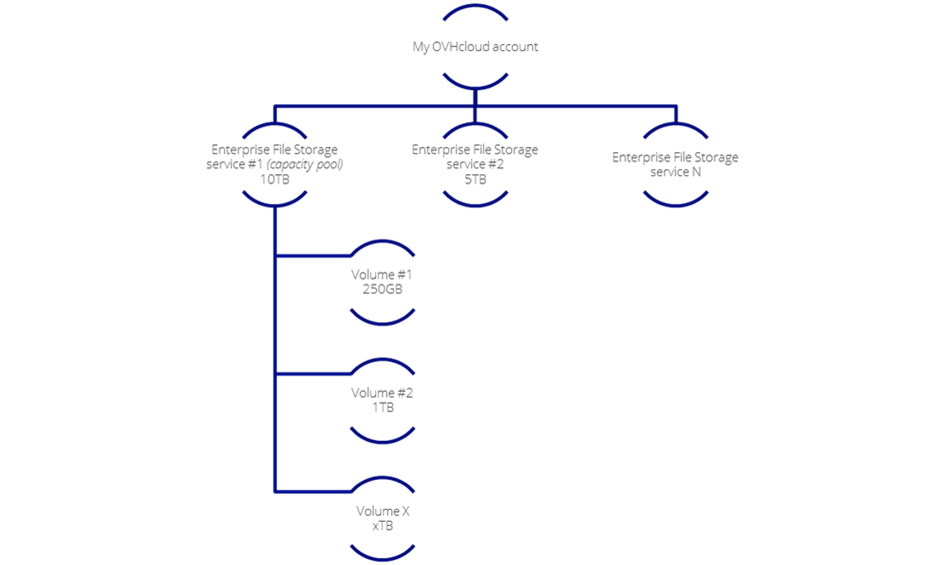
Enterprise File Storage does not yet allow manual modification of the QoS. QoS is defined at the service (pool) level.
How to maximise file system performance
In order to maximise the performance of your Enterprise File Storage, there are some important considerations:
- Remember to reserve your Enterprise File Storage in the same data centre as your workloads. Latency between data centres can be high and affect your application’s overall performance.
- For better reliability and maximum bandwidth, favour the latest generation servers as they have the new network interfaces.
- Identify the public bandwidth available on the client servers, to ensure compatibility with provisioned performance and maximise bandwidth.
Performance testing
In order to perform your own performance testing and familiarise yourself with Enterprise File Storage service levels, we recommend using tools like FIO, a popular assessment tool. It provides many adjustable options to simulate the desired workload and provides detailed statistics on storage behaviour under load. It is also available free of charge on a wide range of operating systems.
It is important to test the performance of your Enterprise File Storage in the same data centre as your workloads. Latency between data centres is too high during normal operation for such an assessment to be meaningful.
Before starting the test, verify that the client used for this benchmark has access to your Enterprise File Storage service and a test volume. If you have not done so yet, you can follow the managment from OVHCloud Control Panel guide .
Test Bench
The FIO tool allows you to test several scenarios and modify many test parameters:
- The number of images
- Image size
- Block size
- The duration of the test
- The number of FIO workers
- The access model (read/write/sequential/random), etc.
Below are some examples of fio commands to validate that the maximum number of IOPS (4000) or the maximum bandwidth (64MB/s) can be reached for a 1TB EFS service:
Random read - IOPS max
fio -numjobs=1 -iodepth=128 -direct=1 -ioengine=libaio -sync=1 -rw=randread -bs=8k -size=1G -time_based -runtime=60 -name=test1 -directory=/share-nfsRandom write - IOPS max
fio -numjobs=1 -iodepth=128 -direct=1 -ioengine=libaio -sync=1 -rw=randwrite -bs=8k -size=1G -time_based -runtime=60 -name=test2 -directory=/share-nfsRandom read - Bandwidth max
fio -numjobs=1 -iodepth=128 -direct=1 -ioengine=libaio -sync=1 -rw=randread -bs=64k -size=1G -time_based -runtime=60 -name=test3 -directory=/share-nfsRandom write - Bandwidth max
fio -numjobs=1 -iodepth=128 -direct=1 -ioengine=libaio -sync=1 -rw=randwrite -bs=64k -size=1G -time_based -runtime=60 -name=test4 -directory=/share-nfsSequential read - IOPS max
fio -numjobs=1 -iodepth=128 -direct=1 -ioengine=libaio -sync=1 -rw=read -bs=8k -size=1G -time_based -runtime=60 -name=test5 -directory=/share-nfsSequential write - IOPS max
fio -numjobs=1 -iodepth=128 -direct=1 -ioengine=libaio -sync=1 -rw=write -bs=8k -size=1G -time_based -runtime=60 -name=test6 -directory=/share-nfsSequential Read - Bandwidth max
fio -numjobs=1 -iodepth=128 -direct=1 -ioengine=libaio -sync=1 -rw=read -bs=64k -size=1G -time_based -runtime=60 -name=test7 -directory=/share-nfsSequential write - Bandwidth max
fio -numjobs=1 -iodepth=128 -direct=1 -ioengine=libaio -sync=1 -rw=write -bs=64k -size=1G -time_based -runtime=60 -name=test8 -directory=/share-nfsFor more information, see the FIO documentation.
You can also use other open-source tools such as:
Go further
If you need training or technical assistance to implement our solutions, contact your sales representative or click on this link to get a quote and ask our Professional Services experts for assisting you on your specific use case of your project.
Join our community of Discord users: https://discord.gg/ovhcloud


 Enterprise File Storage - Konzepte
 414
414