

Deploying a Kubernetes Operator written in Golang on OVHcloud Managed Kubernetes
1128 Ansichten
 11.04.2022
  Cloud / Managed Kubernetes Service
Objective
Operators are one way to extend Kubernetes to automate some actions in the cluster.
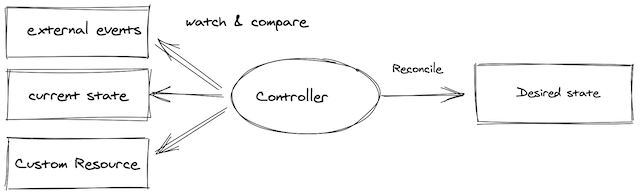
In a few words, an operator offers OPS actions programmatically and avoids repetitive human activities that are devoid of added value. The tasks that an operator can do are various and can be on resources deployed in Kubernetes (like a Pod) or outside (like a database for example). In this guide, we are focusing on resources inside a Kubernetes cluster.
An operator is based on Custom Resources that allow to extend Kubernetes API.
Thanks to the control loop of Kubernetes, the operator maintains the right state of the resources.
Then the operator's job is to monitor the state of the internal or external objects that it manages.
An operator can have various capabilities:
- basic application setup and configuration
- upgrade the application (with rollback if needed)
- backup and recovery if the operator handles a state
- auto-remediation of the application if a problem occurs
- monitoring and observability for its own metrics
- auto scaling, auto tuning...
A good summary of the capabilities of an operator can be found on the operator framework website.
As an operator is a custom API in Kubernetes, you need to develop it. Thankfully there are frameworks to help you to develop your own operator. The most important framework allows you to develop an operator with Ansible, Helm and Go. Other frameworks exist to use other languages, like Java for instance with the Java operator SDK.
As we can see in the tutorial below, the capability of the developed operator depends on the language. For example, developing an operator with Go offers lots of capabilities.
Requirements
This tutorial assumes that you already have a Kubernetes cluster managed by OVHcloud, and some basic knowledge of how to operate it. If you want to know more on those topics, please look at the deploying a Hello World application documentation.
Instructions
In this tutorial, you will create a simple operator that manages the installation of an Nginx server and monitors it.
The operator allows you to:
- install a Nginx server with the required number of Pods
- upgrade the number of Pods
- change the HTTP port
- recreate the service if it is deleted
You'll develop this operator with the operator SDK.
The operator SDK provides several tools:
- a CLI to develop and run locally the developed operator
- several helpers in different languages (Helm, Ansible and Go) to easily develop an operator
In this article, you will use the Go helper.
Install the CLI
The SDK includes a CLI (Command Line Interface).
In order to install the CLI, follow the instructions applicable to your OS.
You can, for example, install it through Homebrew:
Then test if the CLI is correctly installed on your computer:
Output should be like this:
Develop an operator with Go
In this guide, you will use Go to create your first operator.
Scaffold the project
The CLI offers to scaffold an entire project, you don't use all these files for the demo but it helps you to easily bootstrap the project.
More information on the project layout generated by the CLI can be found in the official documentation.
First, create the root folder nginx-go-operator of your project:
Then in the nginx-go-operator folder scaffold the project with the Operator SDK:
For more information about the CLI options see the documentation and for more information about Go configuration (for instance the --repo option) see the dedicated part of the documentation.
Dot not use the repository ovhcloud-devrel as below, it's for example purposes only. Use your own GitHub repository.
Output should be like this:
Warning: If you get an error like:
/Users/xxxxxxxxx/go-operator/nginx-go-operator/bin/controller-gen: No such file or directory
Make sure your GOPATH variable is well defined.
Several resources have been created:
Custom resources definition and controller
The custom resources definition (CRDs) is the main point of the operator.
It allows you to extend the default API of Kubernetes. This means you can work with it the same way you would with its core resources.
In other words, once you have created a CRD, you'll be able to create new resources, called Custom Resources (CRs) to distinguish them from the core Kubernetes resources.
The CRD is some kind of schema for the CR based on it.
It is important to note that CRDs by themselves are just data. They do not have any logic attached to them, nor any special behavior. To add logic you need a controller or an operator.
You need to add an API to create these two kinds of resources:
Output should be like this:
Next you can generate your CRD:
Output should be like this:
After this, new things are generated:
In this tutorial you mainly work with the resources in the following folders: api/v1, config/crd, config/samples and controllers/.
Next, you can have a look at the three main generated files.
The CRD file tutorials.ovhcloud.com_ovhnginxes.yaml in the folder ./config/crd/bases:
The sample CR file tutorials_v1_ovhnginx.yaml in the folder ./config/samples:
The Go controller ovhnginx_controller.go in the folder ./controllers:
Next, you can update the CRD to add fields to manage the Nginx server.
Update the file api/v1/ovhnginx_types.go:
Then generate the manifest:
Output should be like this:
Verify that the CRD file config/crd/bases/tutorials.ovhcloud.com_ovhnginxes.yaml is updated with the two fields (port and replicaCount):
The reconciler
After the CRD you have to update the reconciler to:
- create the
deploymentfor the Nginx pod, - create the
service, - watch the created service to re-create it if it's deleted.
Update the ./controllers/ovhnginx_controller.go file:
If this kind of errors occurs:
You certainly forgot to change the repository name during the init phase of this tutorial.
To fix it, you have to change the import statement in the ./controllers/ovhnginx_controller.go file, replace ovhcloud-devrel GitHub repository in tutorialsv1 "github.com/ovhcloud-devrel/nginx-go-operator/api/v1" with your own GitHub repository.
Test the operator in "dev mode"
Before deploying the operator, you may want to run it locally to avoid the packaging and deploying phases or to set breakpoints in your code.
To do that, launch the following command:
Output should be like this:
There are two commands launched: install and run, the install command creates the CRD in the Kubernetes cluster (based on your .kubeconfig) and the run command executes the operator in dev mode.
You must not stop your operator in your terminal for the next steps of this chapter.
You can create a CR to interact with your operator.
Update the file tutorials_v1_ovhnginx.yaml in the folder ./config/samples:
Before creating the CR, don't forget to create a namespace.
This will be the namespace where the CR will be created and the Nginx server deployed:
Output should be like this:
Then apply the CR to create it in your OVHcloud Managed Kubernetes Cluster:
Output should be like this:
At this time, the operator which is currently running detects the new CR and does a few things:
Let's take a look at the resources in your Kubernetes cluster:
Output should be like this:
You can now visit the URL at the IP mentioned in the EXTERNAL-IP column in the previous output command: http://135.XXX.XXX.206/:
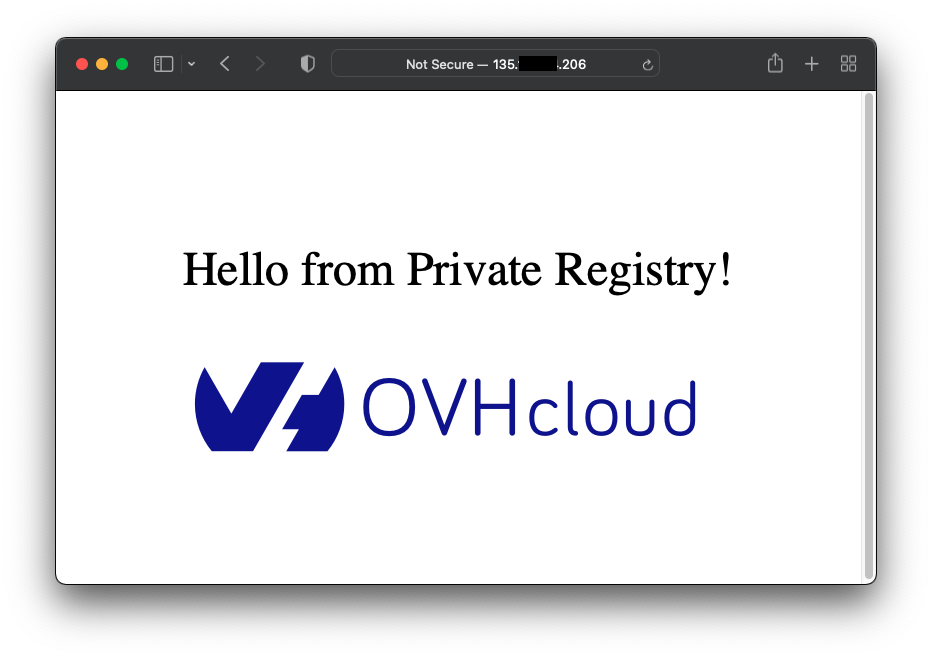
You can apply modifications to the CR to see that the operator reacts as wanted.
Update the file tutorials_v1_ovhnginx.yaml in the folder ./config/samples:
Then apply the CR to create it in your OVHcloud Managed Kubernetes Cluster:
Output should be like this:
At this time, the operator which is currently running detects the modifications of the CR:
Let's take a look at the resources in your OVHcloud Managed Kubernetes cluster:
Output should be like this:
Then, to test the service watching you can delete the service manually:
Output should be like this:
Your operator detects the service deletion and re-creates it:
Finally you can delete the CR to delete the Nginx pods:
Output should be like this:
At this time, the operator which is currently running detects the deletion of the CR:
Let's take a look at the resources in your OVHcloud Managed Kubernetes cluster:
Output should be like this:
You can now stop the local execution of the operator. In the next chapter you will package it and you will deploy it in your OVHcloud Managed Kubernetes Cluster.
Deploy the operator on the OVHcloud Managed Kubernetes cluster
The Operator SDK has created all resources needed to deploy your operator in the OVHcloud Managed Kubernetes.
You can have a look to the following files : ./Dockerfile, ./config/rbac and ./config/manager.
First you need to update the Makefile at the root of the project to change the name and version of the generated image:
If you use the last Mac M1, tests can fail with the error unable to start control plane itself: failed to start the controlplane. retried 5 times: exec: \"etcd\": executable file not found in $PATH". As mentioned in the following issue you have to update test goal of the Makefile as following.
You can now build the image of your operator:
Output should be like this:
Then, push the image to your favorite registry. In order to create a private registry, you can follow the how to create an OVHcloud private registry tutorial.
Output should be like this:
If you are using a private registry, as in the example, you have to create a secret.
First, create a base 64 version of your Docker credentials:
Output should be like this:
Then, create a registry_secret.yaml file in the directory ./config/rbac:
The .dockerconfigjson field value is the previous base 64 encoding result of your Docker's configuration.
Then, add the secret file name in the files list in the kustomization.yaml file in the ./config/rbac directory:
Then, update your service_account.yaml file in the ./config/rbac/ folder to use the previously created secret:
The last step is to deploy your operator in your OVHcloud Managed Kubernetes cluster.
Thanks to the Operator SDK it's done in one line:
Output should be like this:
You can, again, test the operator.
If needed, recreate the namespace test-go-operator.
Apply the CR tutorials_v1_ovhnginx.yaml of the ./config/samples folder:
Output should be like this:
The operator should have created the Nginx pod and its service:
Output should be like this:
Cleanup
If you want, you can uninstall the Nginx server and the operator.
First, delete your CR to delete the deployed Nginx server:
Then, delete the namespace:
Then, delete all resources and the operator itself:
Output should be like this:
What’s next
To go deeper on Kubernetes operators topic, follow others Kubernetes tutorials in the Operators section.
Go further
The operator pattern in Kubernetes.
The operator SDK.
-
If you need training or technical assistance to implement our solutions, contact your sales representative or click on this link to get a quote and ask our Professional Services experts for assisting you on your specific use case of your project.
-
Join our community of users on https://community.ovh.com/en/.


 Deploying a Kubernetes Operator based on Helm on OVHcloud Managed Kubernetes
 378
378