

AI Endpoints - Structured Output
59 Ansichten
 19.12.2025
  AI Endpoints
AI Endpoints is covered by the OVHcloud AI Endpoints Conditions and the OVHcloud Public Cloud Special Conditions.
Introduction
AI Endpoints is a serverless platform provided by OVHcloud that offers easy access to a selection of world-renowned, pre-trained AI models. The platform is designed to be simple, secure, and intuitive, making it an ideal solution for developers who want to enhance their applications with AI capabilities without extensive AI expertise or concerns about data privacy.
Structured Output is a powerful feature that allows you to enforce specific formats for the responses from AI models. By using the response_format parameter in your API calls, you can define how you want the output to be structured, ensuring consistency and ease of integration with your applications.
This is particularly useful when you need the AI model to return data in a specific JSON format.
The JSON schema specification can be used to describe what data structure should the output adhere to, and the AI model will generate responses that match it.
This feature allows for seamless integration of AI-generated data into your applications, enabling you to build robust and consistent workflows.
Objective
This documentation provides an overview on how to use structured outputs with the various AI models offered on AI Endpoints.
The examples provided in this guide will be using the Llama 3.3 70b model.
Visit our Catalog to find out which models are compatible with Structured Output.
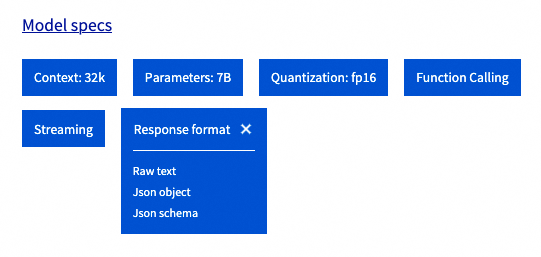
The output formats managed by each model are defined in the Response Format section:
Requirements
The examples provided during this guide can be used with one of the following environments:
Authentication & rate limiting
Most of the examples provided in this guide use anonymous authentication, which makes it simpler to use but may cause rate limiting issues. If you wish to enable authentication using your own token, simply specify your API key within the requests.
Follow the instructions in the AI Endpoints - Getting Started guide for more information on authentication.
Instructions
The response_format parameter of the Chat Completion API allows us to enable and configure the Structured Output features.
Models that support structured output can manage the three following modes:
-
{"type": "text"}The default textual format. This is the same as specifying noresponse_format. -
{"type": "json_object"}The JSON object format is a legacy format that was introduced with the first iteration of Structured Outputs. This mode is non-deterministic and allows the model to output a JSON object without strict validation. -
{"type": "json_schema", "json_schema": .. }JSON schema is a very powerful tool used to specify and validate a JSON data structure. This latest kind ofresponse_formatallows us to enforce custom output formats in LLM outputs using this specification and ensure consistency and interoperability with a variety of platforms and applications.
When using the JSON schema mode, outputs are deterministic and will always adhere to the schema specified.
We recommend using JSON schema over JSON object whenever possible.
JSON schema
The following code samples provide a simple example on how to specify a JSON schema, using the response_format parameter.
For this example, we can use the openai Python library, combined with pydantic for powerful JSON schema management.
Output:
NOTE: this example is using openai_client.beta.chat.completions.parse to leverage automatic parsing with pydantic, but it is also possible to use openai_client.chat.completions.create, by using the response_format parameter and specifying the JSON schema manually.
Input query:
Output response:
As we can see, the response is matching the expected JSON schema!
Output:
This example shows us how to use the JSON schema response format with Javascript.
JSON object
The following code samples provide a simple example on how to use the legacy JSON object mode, using the response_format parameter. Note that when using the JSON object mode, we cannot explicitly specify the schema of the output.
Output:
Input query:
Output:
Output:
Tips and best practices
This section contains additional tips that may improve the performance of Structured Output queries.
Streaming
All kinds of response_format are compatible with streaming. To enable streaming, simply use "streaming": true in your request's body and process the stream accordingly.
Example with python:
Streamed output response:
Schema definition
Some considerations about the JSON schema definition:
- Structured output currently supports a subset of the JSON schema specification. Some features may not be compatible.
- The models will generate the output following alphabetical order of the JSON schema keys. It may be useful to rename your fields to enforce a specific order during generation.
- To avoid divergence, we recommend setting additional properties to
falseand explicity setting the required fields.
Don't hesitate to experiment with different variations of your JSON schemas to reach the best performance!
Prompting & additional parameters
Some additional considerations regarding prompts and model parameters:
- Even though the
response_formatcan be used to enable structured outputs, models can generally perform better when asked to produce json outputs within the prompt (messagesfield). - Most models tend to perform better when using lower temperature for structured outputs.
- Some model providers may recommend specific system prompts and parameters to use for structured outputs and function calling. Don't hesitate to visit the model pages to dive deeper into model specifics (An example for Llama 3.3 on HuggingFace).
Conclusion
In this guide, we have explained how to use Structured Output with the AI Endpoints models. We have provided a comprehensive overview of the feature which can help you perfect your integration of LLM for your own application.
Go further
Browse the full AI Endpoints documentation to further understand the main concepts and get started.
To discover how to build complete and powerful applications using AI Endpoints, explore our dedicated AI Endpoints guides.
If you need training or technical assistance to implement our solutions, contact your sales representative or click on this link to get a quote and ask our Professional Services experts for a custom analysis of your project.
Feedback
Please send us your questions, feedback and suggestions to improve the service:
- On the OVHcloud Discord server.


 AI Endpoints - Features, Capabilities and Limitations
 1016
1016